SOLIDWORKS Masterclass: Workflows & Techniques
- When
- Australia/Sydney (GMT+11)until 4:00 pm
- Where
- WSSH (Western Sydney Startup Hub)5 Fleet St, North Parramatta NSW 2151, Australia
Tickets are sold on Events. We link straight to the listing — nothing is bought here. Listing details come from the source and can change. Eventovia indexes events; it does not organize them or sell tickets. Terms & Disclaimer
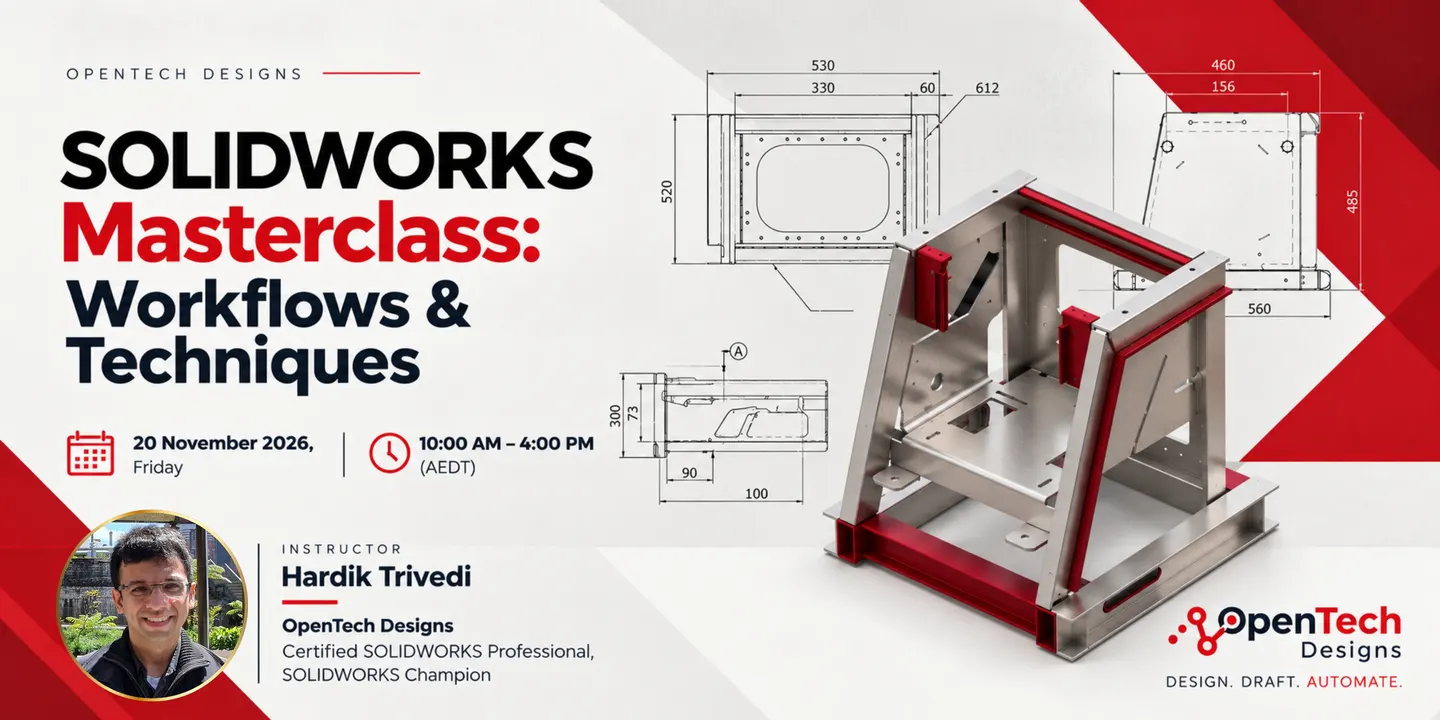
SOLIDWORKS Masterclass: Workflows & Techniques takes place on Fri, 20 Nov 2026 at 10:00 am (GMT+11) at WSSH (Western Sydney Startup Hub) in Sydney, NSW, and runs until 4:00 pm. Tickets are $216.70 + on Events.
About this event
Hardik Trivedi hosts a half-day, in-person SOLIDWORKS workshop for experienced users, focusing on efficient modeling and drawing techniques to improve productivity.
Full description from organizerShow less
If you already know your way around SOLIDWORKS but feel like you're still doing things the slow way (rebuilding features that break, cleaning up messy drawings, re-typing the same annotations, chasing down BOM errors), this masterclass is built for you. SOLIDWORKS Masterclass: Advanced Modelling & Drawing Workshop is a half-day, in-person training session run by Hardik Trivedi, Founder of OpenTech Designs, Certified SOLIDWORKS Professional and SOLIDWORKS Champion. This is not an introductory course. It's a practical, productivity-focused session for designers, drafters and engineers who already understand the basics and are ready to work faster and more efficiently. You'll spend the session working through real modelling and drawing problems, the kind that show up daily in engineering, manufacturing and product development. The focus is on efficient work processes: building models that are easier to change, drawings that update automatically, and habits that reduce rework across the whole design-to-manufacturing workflow. With only 10 seats, there's time to discuss your own work. Bring your own parts or drawings and apply what you learn to them during the discussion sessions. By the end of the session, you'll walk away with practical techniques you can apply immediately, reference material and a productivity checklist, and a clearer strategy for how your team should build parts, assemblies and drawings. Who this is for • SOLIDWORKS users with at least 6–12 months of hands-on experience • Design engineers, drafters and CAD technicians in manufacturing, product development or engineering firms • Teams looking to standardise modelling and drawing practices • Anyone who feels their models and drawings take longer to build and maintain than they should This masterclass is not suitable for complete beginners or people who have never used SOLIDWORKS. What you'll learn • How to build models with design intent, so changes don't break the rest of your feature tree • Parent-child relationships and feature order planning that keep models stable • Efficient sketching habits that reduce over-constraining and rebuild errors • Feature tree organisation that makes models easier to understand and hand off • Parametric modelling with equations, global variables and linked equations • Master Sketch techniques for controlling key design geometry across parts • Practical use of configurations to manage part variations without duplicating files • Multi-body part modelling strategies, and when to use them instead of multiple parts or assemblies • Reliable sheet metal flat patterns and weldment structural members • Building and reusing drawing templates, sheet formats and custom properties • Faster, more consistent drawing views, dimensions and annotations • BOMs linked to configurations, and cut lists for weldments • Revision control habits and design tables • Model clean-up and repair strategies for rebuild errors and imported geometry • Basic SOLIDWORKS macros, batch tasks and automation options to reduce repetitive work • Customising the interface to work faster • Common modelling and drawing mistakes, and how to avoid them What to bring • A Windows laptop capable of running SOLIDWORKS • A licensed or trial copy of SOLIDWORKS installed and tested before the session (see the confirmation email for supported versions) • A mouse suitable for CAD work • A notebook or note-taking device • Optional: your own parts, assemblies or drawings you'd like to work on during the discussion sessions Prerequisites • Working knowledge of basic SOLIDWORKS part modelling and drawing creation (sketches, basic features, basic drawing views) • SOLIDWORKS installed on your laptop before the session • This is an intermediate/advanced session. No beginner instruction is provided on basic sketching or interface navigation What's included • Half-day, in-person masterclass in a small group of up to 10 • Example files, plus time to apply the techniques to your own models • Quick reference and productivity checklist to take home • Certificate of completion, emailed after the workshop Lunch is not included. There's a 1-hour lunch break, and Havenstone café is on site at 5 Fleet St.
Keep going
All Sydney events →Similar events
View all →






![Content That Sells - Live Workshop [SYD]](/img/w448/aHR0cHM6Ly9pbWcuZXZidWMuY29tL2h0dHBzJTNBJTJGJTJGY2RuLmV2YnVjLmNvbSUyRmltYWdlcyUyRjExOTQzMjg5NDMlMkYxNDA3MjU5ODMxNDIzJTJGMSUyRm9yaWdpbmFsLjIwMjYwOTI1LTAwMTg1OD9jcm9wPWZvY2FscG9pbnQmZml0PWNyb3Amdz01MTImYXV0bz1mb3JtYXQlMkNjb21wcmVzcyZxPTc1JnNoYXJwPTEwJmZwLXg9MC41JmZwLXk9MC41JnM9MmU5MzBjNzAyYThmNjg1MDdjZjI0NGExMGM0YjVmZjk.webp)

Details
- When
- Fri, 20 Nov 2026 · 10:00 am (GMT+11) · until 4:00 pm
- Where
- WSSH (Western Sydney Startup Hub)
- Address
- 5 Fleet St, North Parramatta NSW 2151, Australia
- Price
- $216.70 +
Questions
- When is SOLIDWORKS Masterclass: Workflows & Techniques?
- Fri, 20 Nov 2026 at 10:00 am GMT+11.
- How much are tickets for SOLIDWORKS Masterclass: Workflows & Techniques?
- Tickets are $216.70 +.
- Where is SOLIDWORKS Masterclass: Workflows & Techniques?
- WSSH (Western Sydney Startup Hub), 5 Fleet St, North Parramatta NSW 2151, Australia, Sydney, NSW.
- Where can I buy tickets for SOLIDWORKS Masterclass: Workflows & Techniques?
- Tickets are sold on Events. This page links straight to that listing; no tickets are sold here.
- What time does SOLIDWORKS Masterclass: Workflows & Techniques end?
- It runs until 4:00 pm.